Introduction Last updated: April 10, 2025

Description

Product Compare For WooCommerce allows your customers to easily compare multiple products side-by-side based on features, price, ratings, and other important product attributes. This plugin helps customers make better purchasing decisions by giving them a clear comparison table of selected products directly from your WooCommerce store. With an intuitive interface and user-friendly design, customers can quickly add products to the compare list from shop or product pages, view detailed comparisons, and remove items effortlessly. Product Compare For WooCommerce is a simple yet powerful tool to improve the shopping experience, increase user engagement, and boost conversions by helping customers find the right product faster.

Prerequisites:

To use the Product Compare For WooCommerce, you must have the WooCommerce plugin installed and activated on your WordPress website.
Installation

To install the Product Compare For WooCommerce plugin, you can easily upload it directly through your WordPress admin dashboard. This method is quick and user-friendly, allowing you to install and activate the plugin without needing FTP access. Follow the steps below to get started.

Upload Via WordPress Admin

  1. Log in to your WordPress admin dashboard. In the menu bar on the left, hover over the Plugins option. From the dropdown menu, click on Add New.
  2. In the search bar on the Add Plugins page, type Product Compare For WooCommerce. Once you see the plugin in the search results, click the Install Now button.
  3. After the installation is complete, click the Activate button to enable the plugin.

Upload via FTP

  1. Download the Plugin: Start by downloading the Product Compare For WooCommerce plugin as a .zip file from the plugin's download link.
  2. Extract the Plugin: Extract the downloaded .zip file on your computer. This will create a folder containing the plugin files.
  3. Connect to Your Website via FTP: Open your preferred FTP client and connect to your website's server using your FTP credentials.
  4. Upload the Plugin: Drag and drop the extracted plugin folder from your computer into the /wp-content/plugins/ directory in the FTP client. Wait for the upload to complete.
  5. Activate the Plugin: Log in to your WordPress admin dashboard. Go to Plugins > Installed Plugins and click Activate to enable the plugin.

Settings

The Product Compare Plugin for WooCommerce provides easy-to-use settings to control the compare feature on your store.

You can enable or disable the compare feature, customize the compare button text, choose product fields to display in the comparison table, and highlight the differences between products.

The settings are simple, flexible, and help you easily manage the product comparison experience to match your store design and customer needs.

General Features


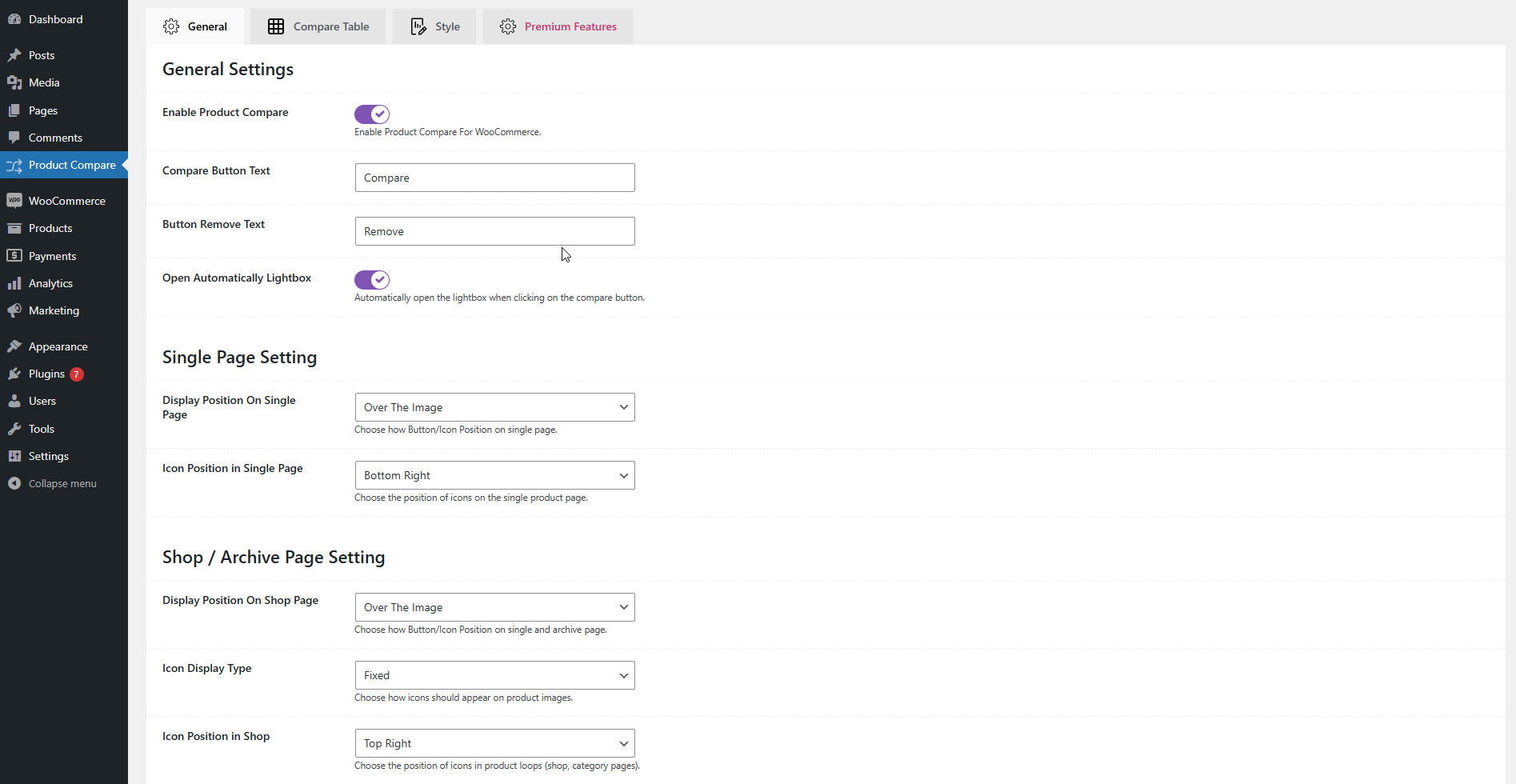
  • Enable Product Compare: Easily enable or disable the compare feature on your store.
  • Compare Button Text Options:
    • Set Custom Compare Button Text
    • Set Custom Remove Button Text
  • Lightbox Settings: Option to Open Compare Table Automatically in Lightbox when products are added.
  • Single Product Page Settings:
    • Choose Display Position for Compare Button
    • Set Icon Position
  • Shop / Archive Page Settings:
    • Choose Display Position for Compare Button on Product List/Grid
    • Select Icon Display Type (Fixed/Hover)
    • Set Icon Position

Table Features


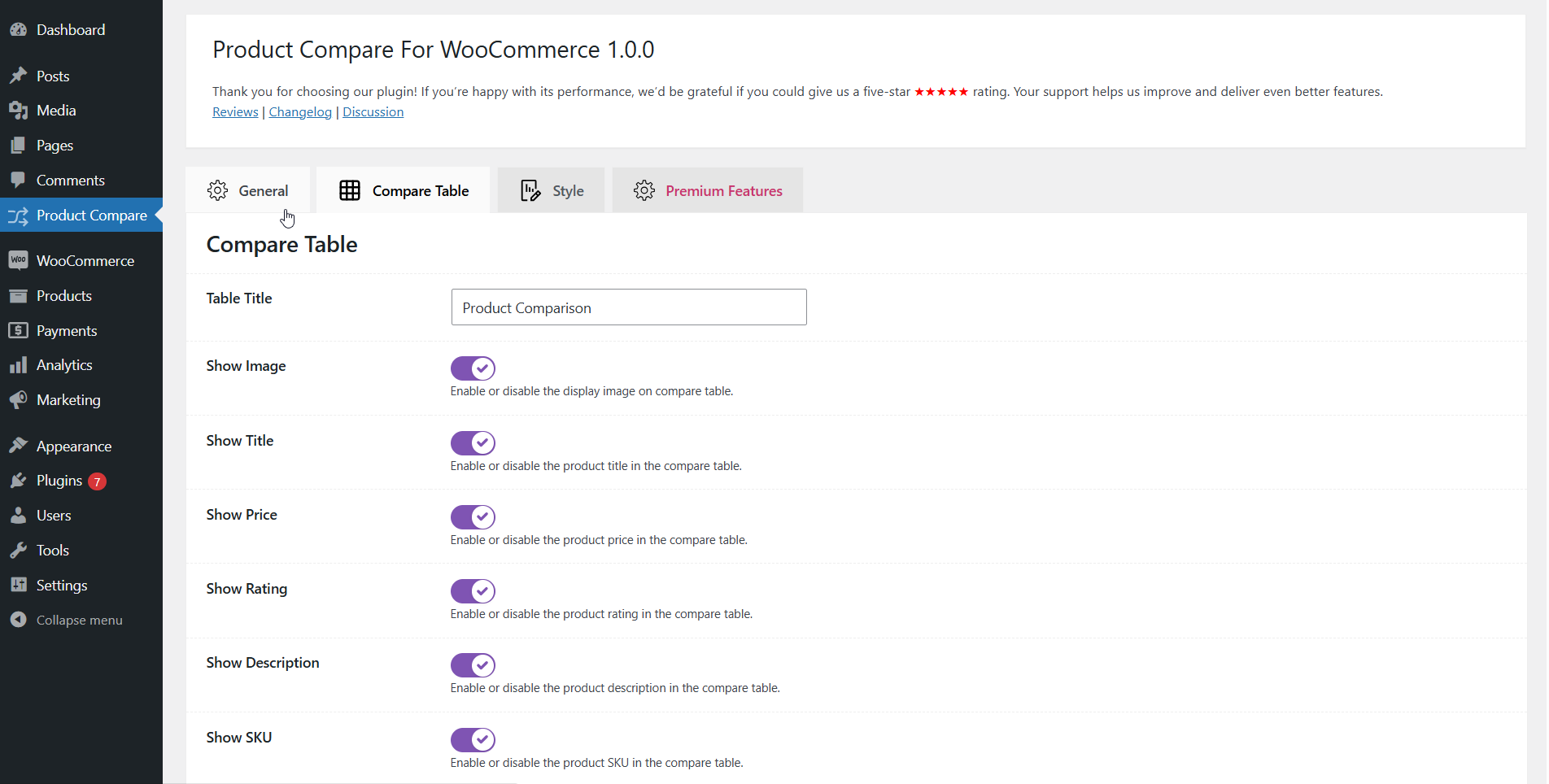
  • Customize Table Title
  • Product Data Display in Comparison Table:
    • Show Product Image
    • Show Product Title
    • Show Product Price
    • Show Product Rating
    • Show Product Description
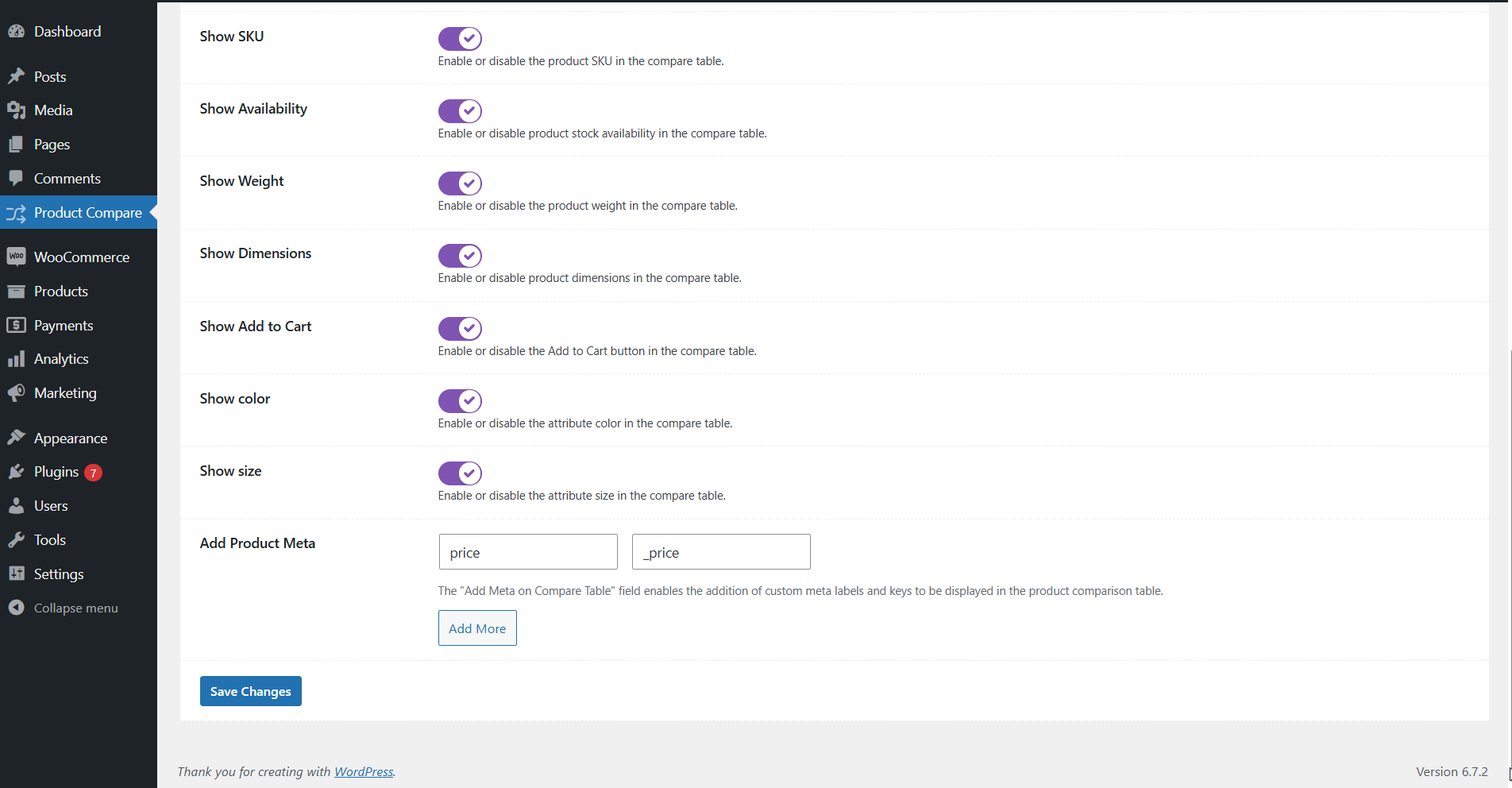
    • Show Product SKU
    • Show Product Availability Status
    • Show Product Weight
    • Show Product Dimensions
    • Show Add to Cart Button
    • Show Custom Attribute
  • Advanced Product Comparison:
    • Add Product Meta to the comparison table

Style Features


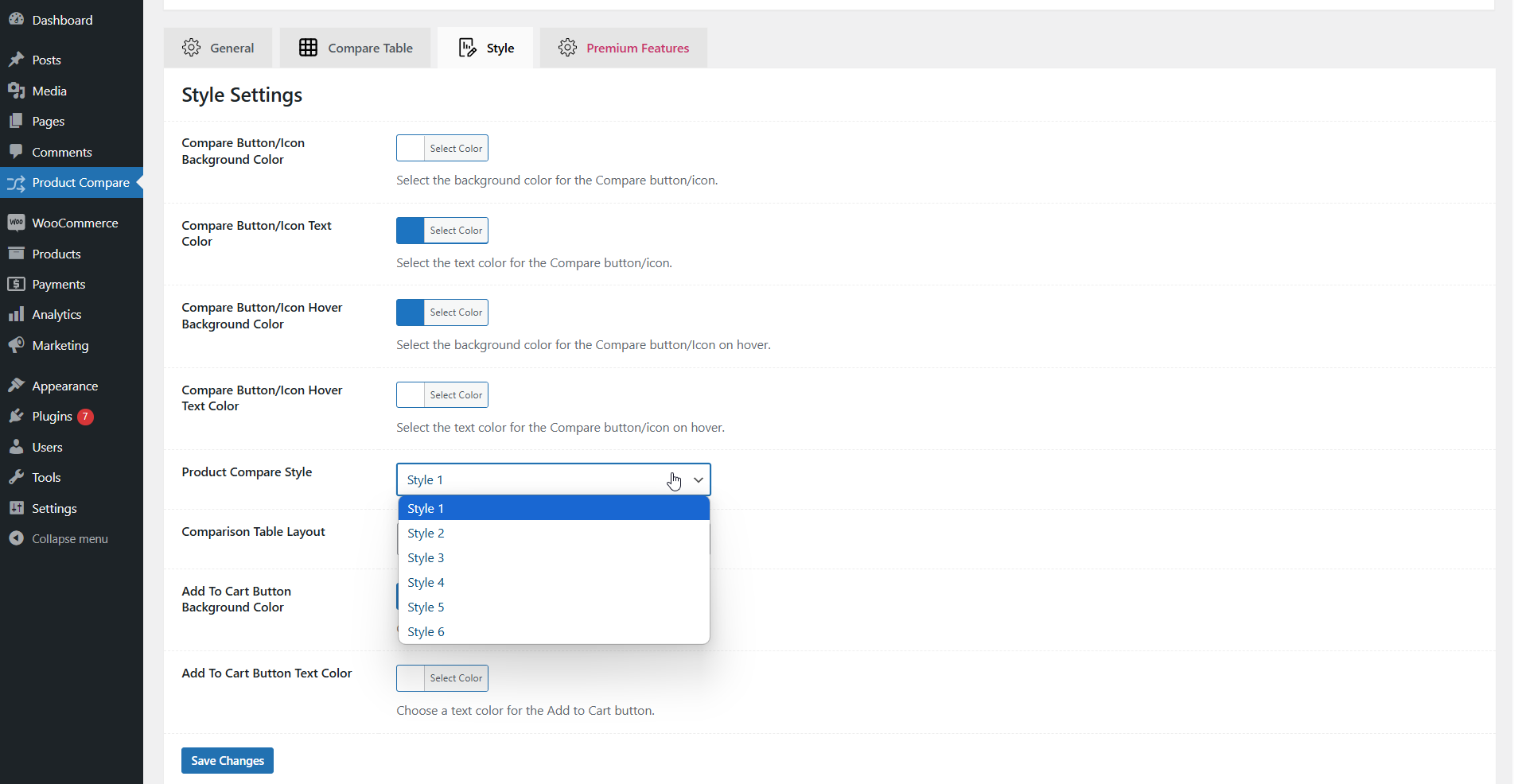
  • Customize Compare Button/Icon Colors:
    • Compare Button/Icon Background Color
    • Compare Button/Icon Text Color
    • Compare Button/Icon Hover Background Color
    • Compare Button/Icon Hover Text Color
  • Predefined Styles for the Product Compare Table
  • Choose Comparison Table Layout (Vertical or Horizontal)
  • Set Custom Color and Background Color for Predefined Style

Premium Features


  • Enhanced Comparison Features:
    • Hide Similarities between products
    • Highlight Differences for easy comparison
    • Related Product Compare feature
  • Improved User Experience:
    • Shareable Comparison Table URL for easy sharing
    • Enable Sticky Bar for Product Comparison

Shortcode

Use the [pcwc_product_compare] shortcode to display a product comparison table on any page, post, or anywhere on your website.

This shortcode allows you to manually select specific products by their IDs and display them in a clean and responsive comparison table layout. You can also customize the table style and add a custom title as per your requirement.

Shortcode:

[pcwc_product_compare]

Shortcode Parameters:
  • products — Pass product IDs separated by commas.
    Example: products="93,94,142,162"
  • style — Set the table style layout. Available values:
    compare-table, compare-table2, compare-table3, compare-table4, compare-table5, compare-table6
  • title — Set a custom title for the compare table.
    Example: title="My Product Comparison"
Usage Example:
[pcwc_product_compare products="93,94,142,162" style="compare-table2" title="Compare Best Products"]
Output:

This shortcode will display a product compare table with the selected products, chosen style, and custom title.

Guideline Video

Watch the complete guideline video to learn how to set up and use the Product Compare for WooCommerce plugin. This video covers all the plugin features, settings, and how to display the product comparison table on your website.

Changelog

You can view the Product Compare For WooCommerce plugin changelog and version history in the plugin's official documentation or on its WordPress plugin page. This includes detailed information about updates, new features, bug fixes, and version releases.

	-----------------------------------------------------------------------------------------
	Version 1.0.0 
	-----------------------------------------------------------------------------------------

	- Initial Release